 KICK
Player card
In short
The player card in Kickhood is an ID card showing your player's overall rating, position, six summary values and career details. Its tier, Bronze, Silver, Gold or Special, follows the overall rating. Tap it to flip to the back; the "Paylaş" (share) button turns it into an image and opens the phone's share sheet.
What is the player card in Kickhood?
The player card in Kickhood is a two-sided ID card that sums up your player at a glance. The front shows the overall rating (OVR), a position code (for example KNT for winger), a flag, the club's crest and name, a 3D portrait of your player and their name. At the bottom are the card tier and a "season · age" line.
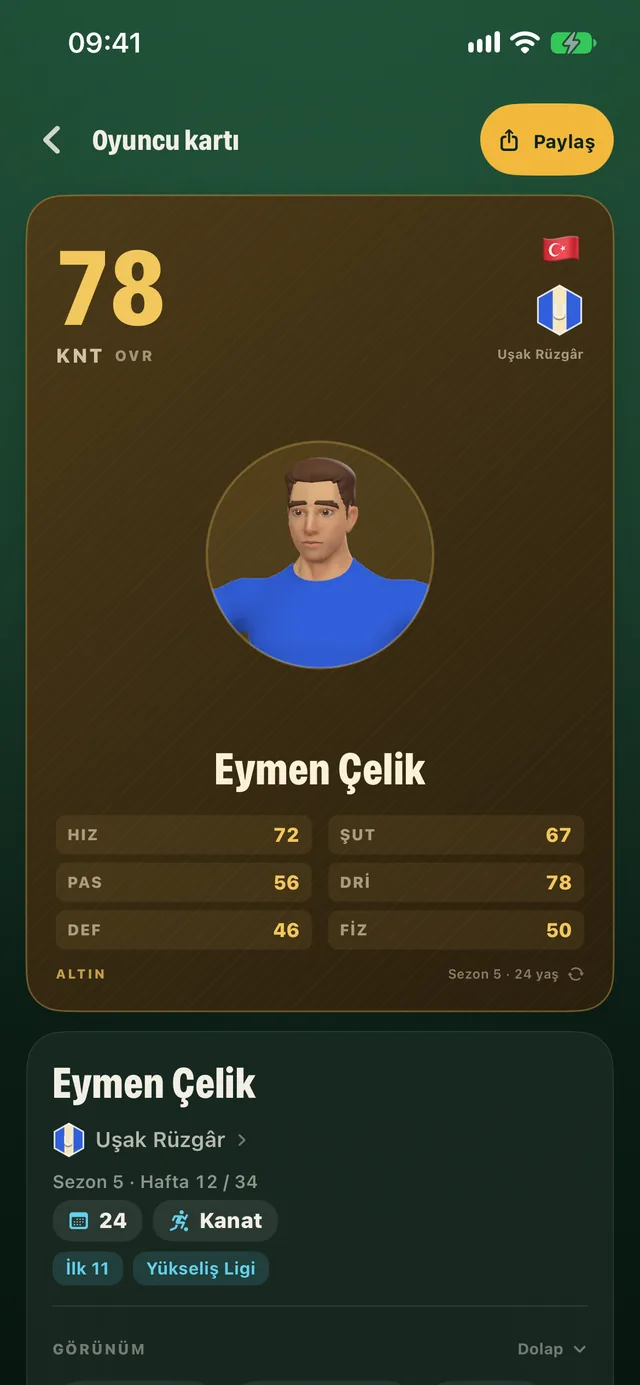
The card's summary values
Summary values in Kickhood are the six numbers on the front of the player card. Each one combines several attributes, and the back of the card lists which ones under "ÖZET DEĞERLER" (summary values).
| Outfield player | Goalkeeper |
|---|---|
| HIZ (pace) | UÇUŞ (diving) |
| ŞUT (shooting) | EL (handling) |
| PAS (passing) | AYAK (kicking) |
| DRİ (dribbling) | REF (reflexes) |
| DEF (defending) | HIZ (speed) |
| FİZ (physical) | POZ (positioning) |
The back of the card
The back of the card in Kickhood is the side you see when you tap the card, and it holds your career details. With "Reduce Motion" on, the card crossfades instead of flipping.
The back lists:
- Career matches, goals and assists, plus this season's matches and goals
- Number of cups and your market value
- Strong foot, weak foot (out of 5) and height
- The season your contract ends
- Your coach, the coach's trust in you and the team captain
- Position history
- Which attributes make up each summary value
- The career's seed code
Card tiers
Card tiers in Kickhood are four steps that set the card's colour, based on overall rating. The colours are matte, with no shine.
| Tier | Overall rating |
|---|---|
| BRONZ (bronze) | Below 55 |
| GÜMÜŞ (silver) | 55–69 |
| ALTIN (gold) | 70–84 |
| ÖZEL (special) | 85 and above |
When your overall rating rises, a "KART YÜKSELDİ" (card upgraded) strip appears with the old and new values and the new tier.
Where does the player card appear?
The player card in Kickhood shows up on several screens:
- At the top of the player page, full size,
- On the attributes screen, small,
- In the season summary,
- In the career summary.
Sharing the card
Sharing the card in Kickhood turns its front into a high-resolution image and opens the phone's share sheet. You do it with the "Paylaş" button on the "Oyuncu kartı" (player card) screen. The image is made on the phone and never sent to a server. You choose where it goes.
Why does it work this way?
Kickhood's design plan expects players to want to show off their careers and solves that with a serverless share card: the image is built on the phone, and the decision to share is entirely yours. Tier names and colours were chosen so progress reads at a glance. The matte colours come from the game's broader visual language, which avoids shine and flashy effects.
FAQ
How do I raise my card tier in Kickhood?
The card turns Silver at an overall rating of 55, Gold at 70 and Special at 85. Training and development raise your overall rating; see Development.
How do I see the back of the player card?
Just tap the card. With "Reduce Motion" on, it crossfades instead of flipping.
Does sharing the card send any data?
No. The image is created on the phone and only goes to the app you pick. The game has no server.
What values does a goalkeeper's card show?
UÇUŞ, EL, AYAK, REF, HIZ and POZ: diving, handling, kicking, reflexes, speed and positioning.
Images come from a development build of the game.